



let's talk

Who is watching your agents?
How Microsoft Agent 365 helps you discover, govern and secure every AI agent in your organisation. A recap of our webinar of 24 November 2026 with Tom Vanderstraeten.
AI agents are entering organisations faster than IT can follow. In our webinar, Tom Vanderstraeten, AI Workplace Team Lead and trusted advisor for governance and data security at The Flow, showed what that means in practice, and how Microsoft Agent 365 helps you keep control. He did it through the story of Sarah.
In this blog:
- Meet Sarah, and her agent
- The agent worked. The operating model didn't.
- Observe, govern, secure: how Agent 365 helps
- Don't forget the bill
- Fresh from Ignite
- What do you need?
- Where to start
- Want to know where your organisation stands?
1. Meet Sarah, and her agent
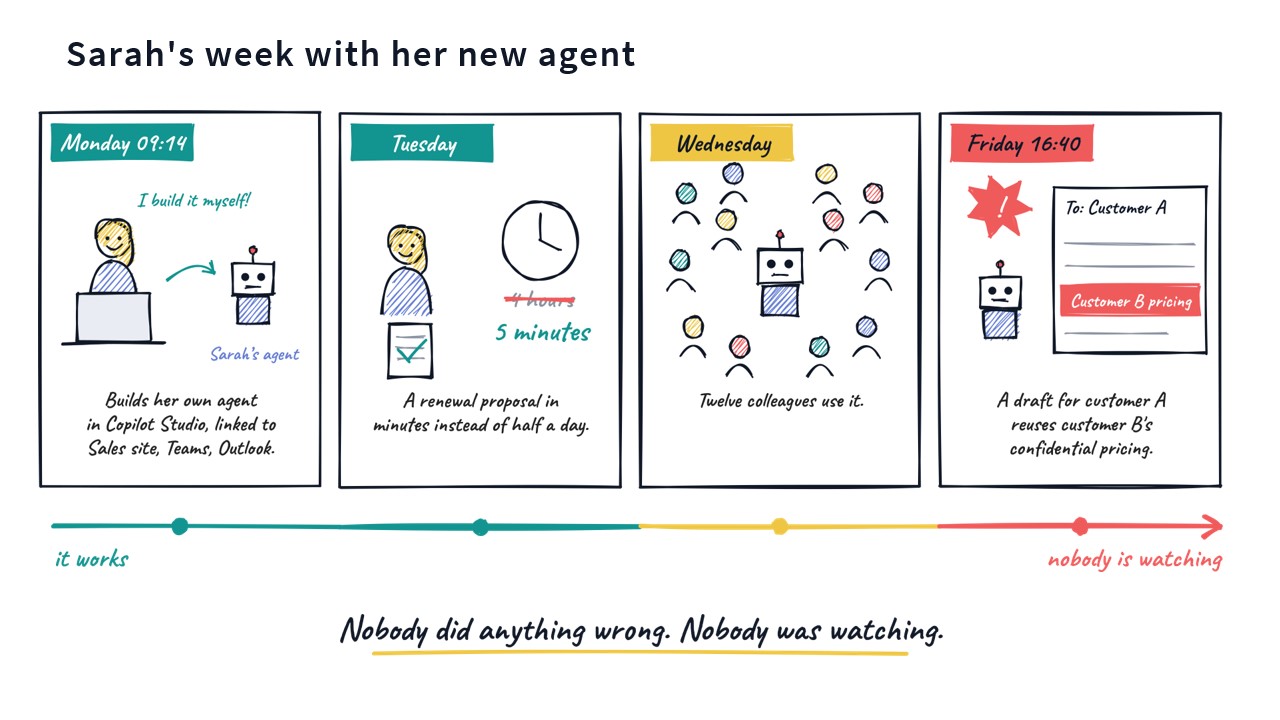
Sarah is a sales manager at a fictional distributor with 450 employees. She leads a team of 12 account managers, who all received a Copilot licence this spring. Every quarter, they create a pile of renewal proposals, and each one takes half a day. The pricing and customer information they need is spread across SharePoint, OneDrive, email and Excel.
Sarah has some technical background and an "I can build it myself" mindset. She could use Copilot, or an external AI tool. Instead, she builds her own agent in Copilot Studio and connects it to SharePoint, Teams and Outlook.
Her week looks like this:
- Monday: she builds the agent in a few minutes. It works.
- Tuesday: a proposal and follow-up email now take 5 minutes instead of 4 hours.
- Wednesday: all 12 colleagues are using the agent.
- Friday: the first errors appear. A proposal for customer A contains customer B's pricing.
Nobody did anything wrong. As Tom put it: nobody was watching.
2. The agent worked. The operating model didn't.
Sarah's agent did exactly what it was built to do. The problem was everything around it. Four things were never defined:
- Owner: Sarah is the owner by default. But what happens to the agent if she leaves or changes roles? It just keeps running.
- Access: the agent could read the entire SharePoint site, including every customer's pricing.
- Approval: IT and security never saw the agent before it was shared and started sending emails on its own.
- Monitoring: nobody tracked who was using it, what it produced or what it consumed.
And Sarah's agent is far from unique. Software vendors switch on agents in applications you already use. Agents run locally on laptops. Cloud agents appear in Copilot Studio, Microsoft Foundry and Agent Builder. At one of Tom's customers, the number of agents grew by 20% in a single week.
The challenge: our identity, data and audit tools were designed for people, not for agents. That leaves every IT leader with three questions:
- Can we see every agent, and what it does?
- Can we steer it, with an owner, the right permissions and a lifecycle?
- Can we protect our data while it runs?
3. Observe, govern, secure: how Agent 365 helps
The good news: you don't need a whole new toolset. Agent 365 lets you apply the controls you already use for people, in Entra, Purview and Defender, to agents too. It does that in three steps.
Observe: see every agent
Agent 365 gives you one registry of all agents in your organisation. That includes agents built in Copilot Studio, Agent Builder and Foundry, agents from other platforms, and local "shadow AI" agents on managed devices. The agent map shows what each agent connects to, which data sources and tools it uses, which model runs it and who is using it, with risky connections marked in red.
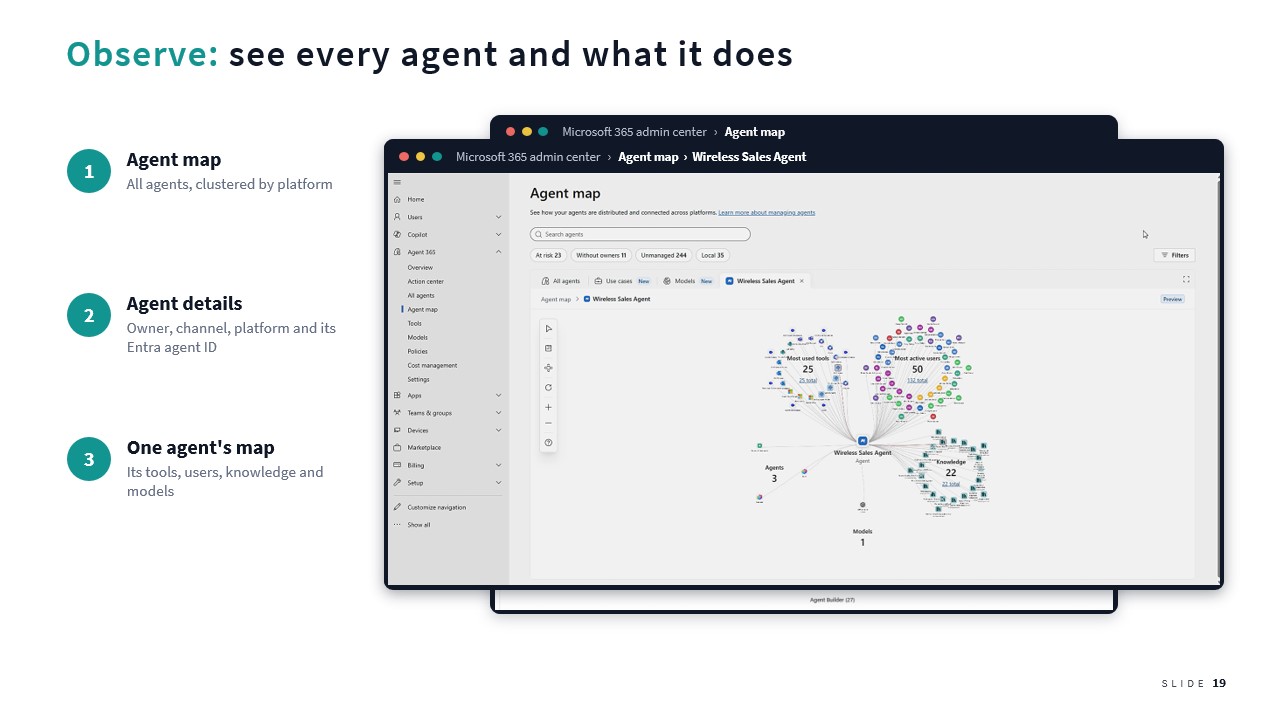
With Agent 365, Sarah's agent would have shown up in the registry on Monday afternoon, flagged because it was already shared with 12 users and connected to sensitive sources. Long before Friday.
Govern: give every agent an owner and a lifecycle
Agents created in Copilot Studio get their own identity in Entra ID. Around that identity you can set:
- an owner and a sponsor, so there is always a human to turn to
- an approval flow before an agent can be shared widely, instead of the default where anyone can create agents and share them with the whole organisation
- lifecycle policies that disable or delete agents after a set period
For Sarah, that means: she is the owner, her manager the sponsor, the agent only accesses what it needs, and it is reassigned or retired when she leaves. One caveat Tom shared: agents built with Agent Builder do not receive an agent identity yet. For now, they only appear in the agent map.
Secure: protect your data while agents run
- Conditional access now works for agents, including custom attributes such as "approved", "pending" or "rejected" to block agents that haven't been approved.
- Purview DLP keeps sensitive or labelled data away from agents and Copilot. On endpoints, it can even stop files or pasted content from ending up in tools like ChatGPT.
- Insider risk management (in preview) will monitor what agents generate, and alert you on risky output or autonomous actions.
- Defender detects attacks and malicious instructions aimed at agents.
Tom's key message here: it all starts with your data. If your data is identified and governed properly, agents become a lot less risky.
4. Don't forget the bill
Secure and governed doesn't automatically mean affordable. In week two, Sarah adds triggers so her agent runs 24/7 on every incoming email, and switches to a premium reasoning model for better proposals. At the end of the month, finance receives the bill.
What drives the cost of an agent:
- the model it uses
- autonomous triggers that make it run on its own
- the actions and tools it calls
- the volume: with consumption billing, colleagues without a Copilot licence can use a shared agent and consume credits
In short: a Copilot licence doesn't mean your agents run for free. Today, you can follow agent costs with a Power BI template, which doesn't require Agent 365. Microsoft is now also rolling out Agent 365 Business Analytics, with consumption per service and model, insights into the value agents deliver, and a cost forecast.
5. Fresh from Ignite
Microsoft announced 32 updates around Agent 365 at Ignite, most of them in preview. A few highlights:
- A broader registry: more platforms can be connected, such as Databricks, so their agents show up in the same overview.
- A new overview of agents without an owner, agents at risk and agents waiting for approval.
- An agent map grouped by use case, so you spot two agents doing the same job with different, and differently priced, models.
- Action Center: automations for inactive or ownerless agents, such as notifying owners, assigning a new owner, or blocking and deleting agents, all from one portal.
- Local and shadow agents, including on which devices they run and who uses them.
The direction is clear: everything related to agent governance comes together in one place.
6. What do you need?
Agent 365 is a licensing question, and you can grow into it step by step:
- E3 or a comparable business licence: includes a basic version of the agent registry, so you already see which agents exist.
- E5, or the Defender and Purview suites as an add-on: adds the data security capabilities, and is the prerequisite for the Agent 365 add-on.
- The Agent 365 add-on: unlocks everything described above. It is licensed per user, for everyone who creates agents. A few licences are enough to start exploring.
- Microsoft 365 E7: bundles E5, Microsoft 365 Copilot, Agent 365 and the Entra Suite, at a list price of $99 per user per month.
Two things to keep in mind: consumption costs are never included in a licence, and your own price depends on your agreement with Microsoft.
7. Where to start
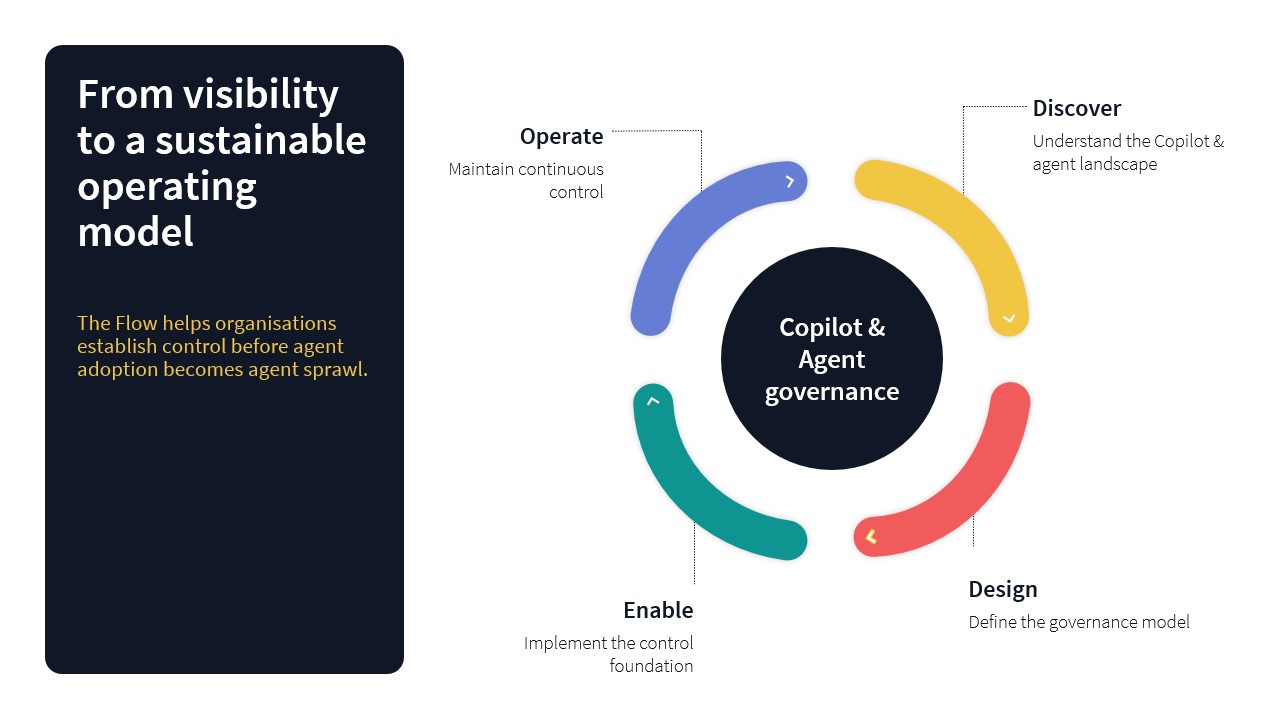
You can't do everything at once. At The Flow, we help organisations go from visibility to a sustainable operating model in four steps: discover, design, enable and operate.
It starts with discovery: a clear view of your Copilot and agent landscape, based on the licences you already have. Even with E3, we can configure the Copilot control baseline, build a first agent inventory, find ownership gaps and oversharing, and report on usage. From there, we build a prioritised roadmap that grows with your licences.
Tom closed with a simple rule:
Every agent is a new colleague. Make sure it has everything a colleague would have: a badge, a manager and an exit date.
8. Want to know where your organisation stands?
Curious how many agents are already running in your organisation, or whether Agent 365 or E7 makes sense for you? Get in touch with us and we'll gladly think along.
stories
More success stories



Billing information
The Flow NV
Veldkant 33A, 2550 Kontich
BE 0676.562.330